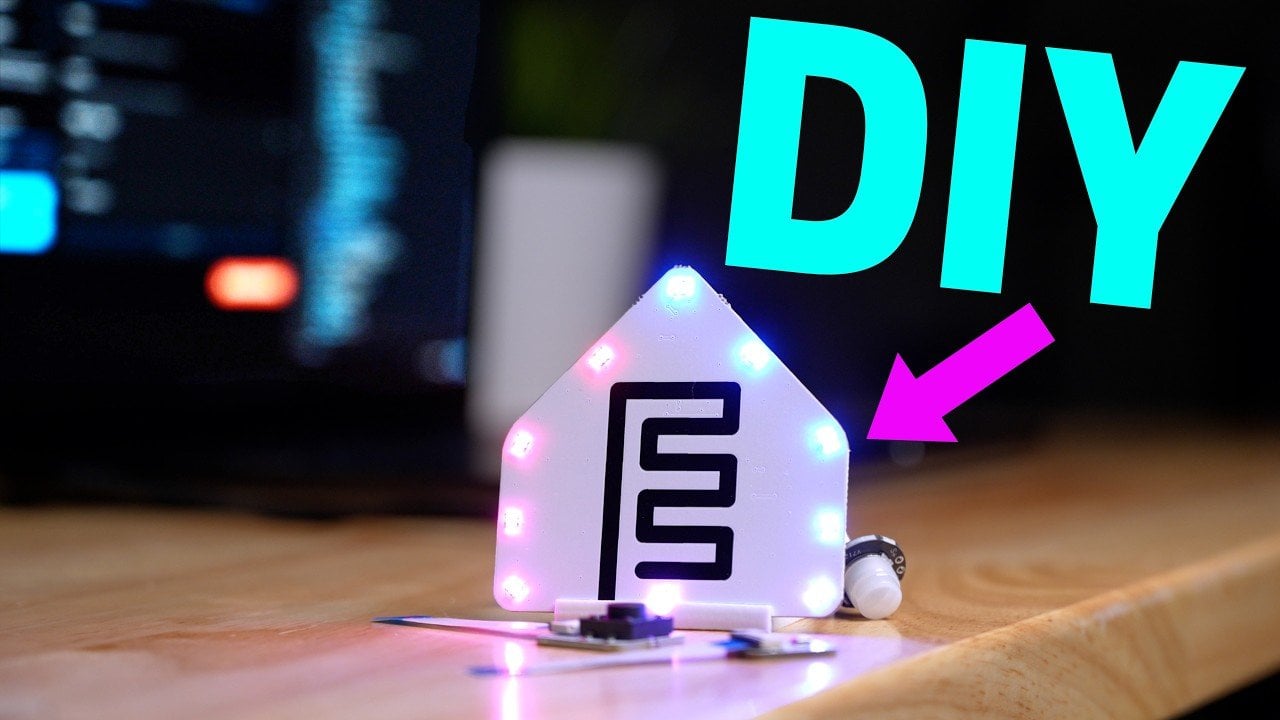
ESP Home Starter Kit: $40 Buys You Full Smart Home Control Without Monthly Fees
Verdict
Best sub-$50 entry point for privacy-conscious builders who want local control without subscriptions.
Best for: Privacy-focused builders, Home Assistant users, anyone tired of subscription fees, DIY learners who want to understand how smart home devices actually work.
Skip if: You want plug-and-play setup, you don't run Home Assistant, you need phone support, you're uncomfortable with basic electronics assembly, or you want pre-built devices that work with Alexa or HomeKit immediately.
Pros
- Fully local operation, no cloud dependency or subscriptions
- ESP32C6 includes Matter, Thread, Zigbee, Bluetooth, and IR in one chip
- Drag-and-drop ESP Home interface removes coding barrier
- Open-source ecosystem with active community support
Cons
- Requires Home Assistant for full functionality
- Initial setup takes 30-60 minutes for first-time users
- No pre-assembled option, requires basic soldering or connector work
What You Get for $40
The ESP Home Starter Kit ships with an ESP32C6 microcontroller, a motion sensor (PIR), a temperature and humidity sensor, an LED and buzzer combo, and ribbon cables for connections. That's the hardware. The real value is the ESP Home firmware platform, which turns this pile of components into a functional smart home device without writing a single line of code.
The ESP32C6 is the standout spec here. It packs Matter, Thread, Zigbee, Bluetooth, and infrared into one chip, which means this $40 kit has more radio protocols than most $200 hubs. You won't use all of them at once, but the flexibility lets you build a motion-triggered light that also acts as a Bluetooth proxy for Home Assistant or a temperature monitor that logs locally and triggers automations without touching the internet.
Assembly requires connecting sensors to the ESP32C6 via ribbon cables. No soldering is strictly required if you buy the right connectors, but expect to spend 20-30 minutes on first setup. The kit assumes you know which GPIO pins to use, but the ESP Home Device Builder app walks you through sensor mapping with a visual interface.
ESP Home Platform: Drag-and-Drop, Then Forget
ESP Home generates firmware from a drag-and-drop interface. You select sensors, configure triggers, and the platform writes YAML code in the background. For anyone who has stared at Home Assistant's configuration files, this is a relief. You don't need to know YAML syntax, you just need to know what you want the device to do.
Example: drag the motion sensor onto the canvas, set it to trigger an LED when motion is detected, and ESP Home compiles the firmware. Flash it to the ESP32C6 over USB or WiFi, and the device is live. Changes take seconds to deploy, which makes iteration fast.
The platform supports local automations, meaning your motion sensor can turn on a light without ever pinging the cloud. If your internet goes down, the device still works. That's the privacy pitch, and it's legitimate. Ring, Nest, and Aqara all phone home by default. This kit doesn't, unless you tell it to.
Home Assistant Integration
The kit is designed to plug into Home Assistant, the open-source home automation hub. Once the ESP device is flashed, Home Assistant auto-discovers it on your network. You'll see the motion sensor and temperature readings appear as entities, ready to trigger automations or display on dashboards.
The ESP32C6 can also act as a Bluetooth proxy, extending Home Assistant's reach to Bluetooth devices in other rooms. That's a secondary benefit, but it turns this $40 kit into a multi-function node rather than a single-purpose sensor.
If you don't run Home Assistant, the kit is less useful. ESP Home devices can work standalone, but you lose the automation logic and dashboard view that makes the ecosystem cohesive.
| Feature | ESP Home Kit | Aqara M3 | Ring Alarm |
|---|---|---|---|
| Local Control | Yes, fully offline | Yes, with hub | No, cloud required |
| Monthly Fee | $0 | $0 | $20 for video storage |
| Setup Time | 30-60 min first device | 5 min plug-and-play | 10 min app setup |
| Device Count | 3 sensors + controller | 7 devices + hub | 14 devices + base |
Setup Reality Check
First-time setup is not instant. You'll install the ESP Home add-on in Home Assistant, connect the ESP32C6 to your computer, flash the initial firmware, then configure WiFi credentials. The motion sensor and temperature sensor need to be wired to the correct GPIO pins, and if you mix up 3.3V and 5V, you'll fry a component.
The ESP Home documentation is thorough, but it assumes familiarity with terms like GPIO, I2C, and binary sensors. If those are new to you, budget an hour for your first build. The second device takes 15 minutes because you've learned the pattern.
Once running, the kit is stable. The ESP32C6 reconnects automatically after power loss, and sensor readings update in real time. There's no polling delay like you get with cloud-based systems.
Expandability
The real win is what happens after the starter kit. ESP Home supports hundreds of sensors, displays, and actuators. You can add a CO2 sensor, an OLED screen, or a relay to control a fan. Each addition follows the same drag-and-drop process.
The ESP32C6's multi-protocol radio stack means you can build a Thread network, pair Zigbee devices, or bridge Bluetooth sensors, all from one controller. Most starter kits lock you into one ecosystem. This one lets you mix and match.
Who Should Skip This
If you want something that works out of the box, buy the Aqara M3 kit instead. It's $120, includes seven pre-assembled devices, and pairs with HomeKit, Alexa, or Google Home in under five minutes. The ESP Home kit requires assembly, configuration, and troubleshooting.
If you don't run Home Assistant and don't plan to, this kit loses most of its appeal. The sensors will work standalone, but you'll miss the automation logic and dashboard that justify the setup effort.
If you need professional monitoring or instant support, Ring or ADT make more sense. Open-source projects rely on community forums, not phone support. When something breaks at 2 a.m., you're Googling error logs, not calling a helpline.
The Subscription Question
Ring charges $20 per month for video storage and professional monitoring. Aqara is free but routes data through Chinese servers. The ESP Home kit costs $40 once, stores everything locally, and never phones home unless you configure it to. Over three years, that's $720 saved compared to Ring's Pro plan.
The privacy benefit is real. Your motion events, temperature logs, and automation triggers stay on your network. No company is mining that data, selling it to advertisers, or handing it to law enforcement without a warrant.
Specifications
| Microcontroller | ESP32C6 (Matter, Thread, Zigbee, BLE, IR) |
| Included Sensors | Motion (PIR), Temperature & Humidity |
| Extras | LED & buzzer combo, ribbon cables |
| Platform | ESP Home (drag-and-drop YAML generator) |
| Integration | Home Assistant, acts as Bluetooth proxy |
| Power | USB-C (cable not included) |
| Price | $40 |
Comparison
| Product | Price | Key Spec | Verdict |
|---|---|---|---|
| ESP Home Starter Kit | $40 | ESP32C6, local control, DIY assembly | Buy for privacy & learning |
| Aqara M3 Hub Kit | $120 | Pre-built, 7 devices, Matter + Thread + Zigbee | Buy for plug-and-play HomeKit |
| Ring Alarm 14-Piece Kit | $380 | 14 devices, cloud required, $20/mo Pro plan | Skip, subscription trap |
Sources
- https://www.geeky-gadgets.com/esp-home-starter-kit/
- https://tech.yahoo.com/home/articles/40-open-source-kit-finally-142224664.html
- https://www.smarthomeexplorer.com/guides/best-smart-home-starter-kit-first-time-homeowners-matter-2026
- https://www.smarthomeexplorer.com/guides/best-smart-home-starter-kits-march-2026
Ready to buy?
Support AIdeaFlow by purchasing through our link. Same price for you.
We may earn a commission from qualifying purchases.
Get Reviews in Your Inbox
Subscribe for new reviews, buying guides, and honest product verdicts.