Logitech MX Master 3S Wireless Mouse: Silent Clicks, MagSpeed Scroll, and a Premium Price
Verdict
The MX Master 3S delivers unmatched productivity features and build quality, but its cost and size make it a Buy only for serious desktop-focused users.
Best for: Productivity users who spend hours at their desk, especially creative professionals, programmers, and multitaskers.
Skip if: You have small hands, need a lightweight gaming mouse, or your budget is under $60.
Pros
- Near-silent clicks with satisfying tactile feedback
- MagSpeed electromagnetic scroll wheel with Smart-Shift
- Excellent battery life (up to 70 days) with USB-C charging
Cons
- High price; not budget-friendly
- Ergonomics favor medium to large hands; too large for small hands
- Polling rate (125 Hz) limits gaming performance
Red Flags
- Logitech Options+ software can be memory-intensive and requires an internet connection for some features
- No native USB-C receiver; the Bolt receiver is USB-C to USB-A adapter
Introduction and First Impressions
The Logitech MX Master 3S is the company's flagship productivity mouse, and it arrives with a reputation that precedes it. Building on the already excellent MX Master 3, the 3S swaps the loud clicks for near-silent switches, bumps the sensor from 4000 DPI to 8000 DPI, and replaces the old Unifying receiver with the new Logitech Bolt technology. The result is a mouse that feels relentlessly polished, but also carries a premium price tag of $99.99. Is it the right tool for your workflow? Let's dive in.
Design and Build Quality
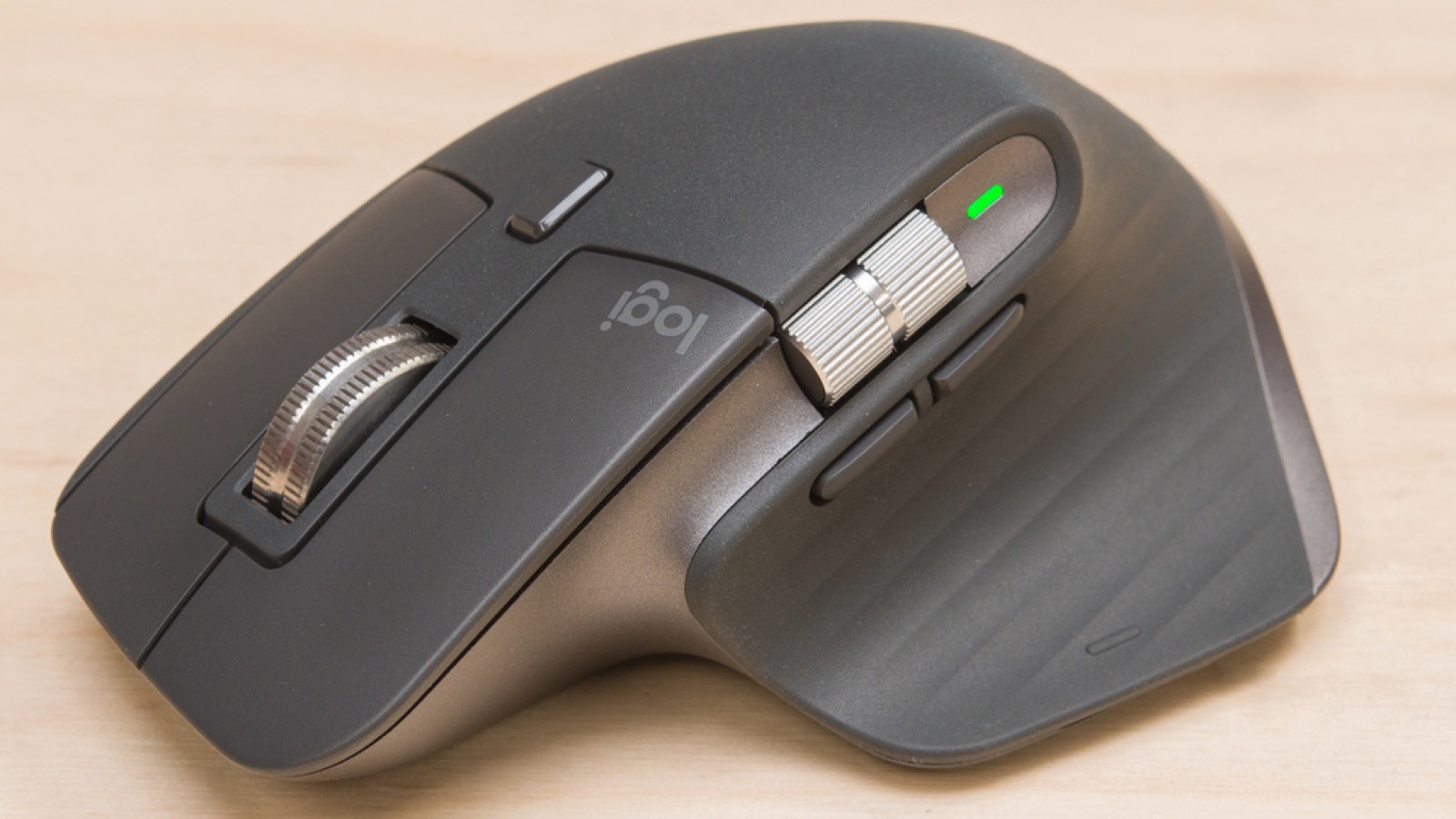
Physically, the MX Master 3S is virtually unchanged from its predecessor. The dark gray (or black) chassis is sculpted from a mix of matte plastic and a soft-touch surface that resists fingerprints. The contoured shape is clearly aimed at medium to large hands and encourages a palm grip. The left side features a sculpted thumb rest with a gesture button and a vertical thumb wheel, while the right side slopes gently for finger placement. At 141 grams, it's not heavy, but it's substantial enough to feel solid on the desk. The USB-C port on the front edge is a welcome modern touch, and the mouse ships with a USB-C to USB-A charging cable. A Logitech Bolt USB receiver is tucked inside the mouse, ready for secure, low-latency connection.
Silent Clicks and MagSpeed Scroll
Two features define the MX Master 3S experience: the silent clicks and the MagSpeed scroll wheel. Logitech has redesigned the main button switches to reduce noise by about 90% compared to the MX Master 3, while retaining a crisp, tactile feel. The clicks are genuinely quiet; you can click rapidly in a quiet office with barely a whisper. The scroll wheel is a marvel of engineering. Using an electromagnetic mechanism, the wheel can switch seamlessly between free-spin mode (spinning freely for fast scrolling) and click-to-click mode (for precise line-by-line scrolling). The Smart-Shift button below the wheel lets you toggle instantly, and you can also adjust the resistance via the Logitech Options+ software. It makes navigating long documents or spreadsheets a joy.
Performance and Connectivity
The 8000 DPI Darkfield sensor tracks on almost any surface, including glass, with impressive accuracy. While 8000 DPI is overkill for productivity (most people run between 1000 and 3000 DPI), the sensor is smooth and responsive, with no acceleration or jitter. The mouse can pair with up to three devices via Bluetooth or Logitech Bolt, and switching between them using the button on the bottom is quick. The Bolt receiver offers a more secure, interference-free connection than plain Bluetooth, and it's backward compatible with older Unifying devices (though not natively; you'll need the Bolt receiver). One limitation is the default polling rate of 125 Hz – that's fine for office work but will feel sluggish in fast-paced gaming. If you need a gaming mouse, look elsewhere.
Software and Customization
Logitech Options+ is the app that unlocks the mouse's full potential. It allows you to remap every button, adjust pointer speed, scroll speed, and assign app-specific profiles. The gesture button (on the thumb rest) becomes a powerful modifier; holding it while moving the mouse triggers actions like window snapping, volume control, or keyboard shortcuts. Options+ also shows battery status, firmware updates, and Flow support, which lets you copy-paste text and files across multiple computers with a single mouse. The software is generally reliable but can feel bloated; it takes up a decent chunk of RAM and requires an internet connection for some features (like downloading profiles from the cloud). Some users may find the constant updates annoying, but overall, it's one of the best mouse customization suites available.
Battery Life and Charging
Logitech claims up to 70 days of battery life on a full charge, and in real-world usage (eight-hour workdays with Bluetooth), you'll likely get close to that. Charging via USB-C takes about three hours to go from empty to full. You can also use the mouse while it's plugged in, thanks to the flexible braided cable. The battery performance is excellent, easily outlasting the 30 to 50-day claims of many rivals.
Comparison to Alternatives
| Product | Price | Key Spec | Our Verdict |
|---|---|---|---|
| Logitech MX Master 3S | $99.99 | MagSpeed scroll, 8K DPI, 7 buttons, 70-day battery | Best for desktop productivity |
| Logitech MX Anywhere 3S | $79.99 | Compact size, MagSpeed, 8K DPI, 70-day battery | Best for portability and travel |
| Razer Pro Click Mini | $79.99 | Silent mechanical switches, 7 buttons, 6 GHz wireless, 65-day battery | Good alternative for smaller hands |
The MX Master 3S dominates the full-sized desktop segment. If you need something compact for on-the-go use, the MX Anywhere 3S is a better fit. Alternatively, the Razer Pro Click Mini offers silent clicks in a smaller chassis and supports 6 GHz wireless for a potentially faster connection, but its scroll wheel lacks the MagSpeed mechanism, which is a major productivity advantage for the Logitech.
Verdict
The Logitech MX Master 3S is the gold standard for wireless productivity mice. Its silent clicks, remarkable scroll wheel, long battery life, and powerful software make it a joy to use for anyone who spends their workday at a desk. The build quality is top-notch, and the premium price reflects that. However, the large ergonomics mean it's not for everyone; users with smaller hands or those on a tight budget should consider alternatives like the MX Anywhere 3S or the Razer Pro Click Mini. If you value comfort, efficiency, and a quiet office environment, and you're willing to invest $100, the MX Master 3S is an easy Buy.
Specifications
| Sensor | Darkfield 8000 DPI optical |
| Connectivity | Bluetooth Low Energy, Logitech Bolt USB (USB-C with USB-A adapter) |
| Buttons | 7 (left, right, middle, back, forward, gesture button, scroll wheel) |
| Scroll Wheel | MagSpeed electromagnetic with Smart-Shift (free-spin/click-to-click) |
| Battery Life | Up to 70 days (rated); USB-C charging (full in 3 hours) |
| Weight | 141 g (4.97 oz) |
| Dimensions | 124.9 x 84.3 x 51 mm |
| Compatibility | Windows, macOS, Linux, Chrome OS, iPadOS, Android |
| Warranty | 1-year limited |
| Price | $99.99 USD MSRP |
Comparison
| Product | Price | Key Spec | Verdict |
|---|---|---|---|
| Logitech MX Master 3S | $99.99 | MagSpeed scroll, 8K DPI, 7 buttons, 70-day battery | Best for desktop productivity |
| Logitech MX Anywhere 3S | $79.99 | Compact size, MagSpeed, 8K DPI, 70-day battery | Best for portability and travel |
| Razer Pro Click Mini | $79.99 | Silent mechanical switches, 7 buttons, 6 GHz wireless, 65-day battery | Good alternative for smaller hands |
Ready to buy?
Support AIdeaFlow by purchasing through our link. Same price for you.
We may earn a commission from qualifying purchases.
Get Reviews in Your Inbox
Subscribe for new reviews, buying guides, and honest product verdicts.