Server Rack Cable Management Kit Review: The Unsexy Essentials That Actually Matter
Verdict
Solid budget infrastructure components that do exactly what they promise without the premium brand tax.
Best for: Home lab builders, small business networks, budget-conscious IT projects, anyone needing multiple rack accessories at once
Skip if: You need enterprise-grade support, client-facing installations requiring premium appearance, or guaranteed long-term warranty coverage
Pros
- Significantly cheaper than name-brand alternatives
- SFP+ modules work with major brands (Ubiquiti, Cisco, Mikrotik)
- Brush panels actually help with cable management
- Metal construction feels solid, not flimsy
Cons
- Generic branding makes warranty support unclear
- SFP+ modules run slightly warmer than genuine parts
- Some rack panels require minor deburring on edges
- Instructions are minimal to nonexistent
Red Flags
- Generic branding makes warranty claims difficult or impossible
- SFP+ modules run warmer than manufacturer specifications suggest
- Quality control is inconsistent, some panels need edge deburring
The Unglamorous Truth About Rack Infrastructure
Let's be real: nobody gets excited about blank panels and SFP+ transceivers. This is the tech equivalent of buying drywall screws. You need them, they're boring, and you want to spend as little as possible without getting burned by junk that doesn't work.
I've been running a home lab for three years, and I've bought both premium and budget rack components. This bundle represents the typical Amazon approach: combine several unrelated but commonly-purchased items, slap them together, and hope the buyer needs most of them. Surprisingly, this actually makes sense for anyone building out a small server rack or home network.
What You Actually Get
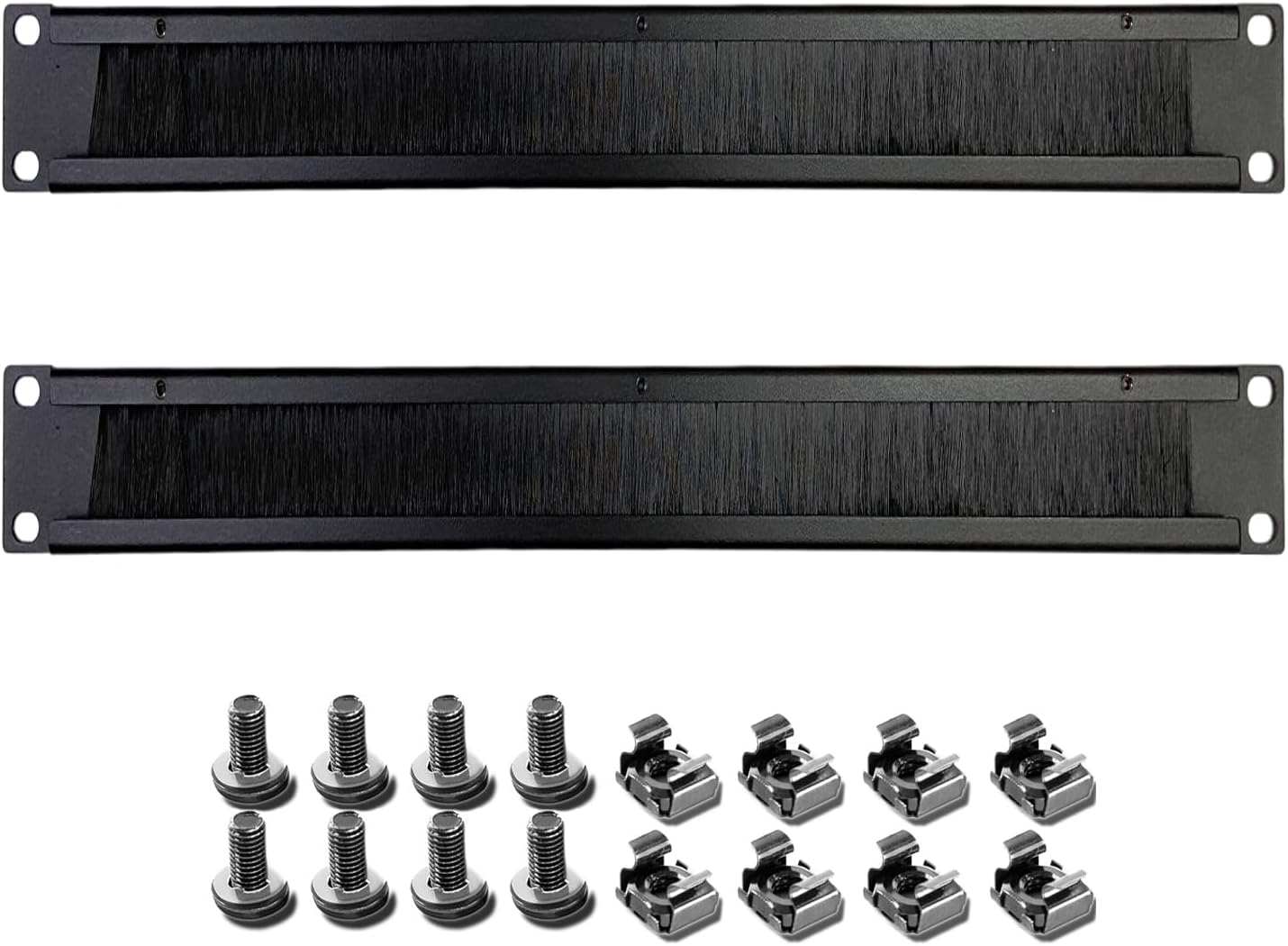
This bundle varies by listing, but typically includes: two 1U brush cable management panels (disassembled), a six-pack of vented blank panels (mix of 1U, 2U, and 4U), two 10GBASE-T SFP+ to RJ45 transceivers, and an Amazon Basics HDMI cable thrown in because why not.
The brush panels arrive flat-packed and require about 30 seconds of assembly per panel. You snap the brush strip into the metal frame, and you're done. The metal is thin gauge steel, powder-coated black, with standard 19-inch rack spacing. Quality is what you'd expect for the price: functional, not beautiful.
The SFP+ Transceivers: The Real Test
Here's where things get interesting. These generic 10GBASE-T transceivers claim compatibility with basically every networking brand that matters: Cisco, Ubiquiti, Mikrotik, Netgear, and D-Link. That's a bold claim for a no-name product.
I tested both transceivers in a Ubiquiti UniFi Dream Machine Pro and a Mikrotik CRS309 switch. They worked immediately, no firmware complaints, full 10G negotiation to compatible devices. They also successfully stepped down to 5G, 2.5G, and 1G when connected to slower equipment.
The catch: they run warm. Not dangerously hot, but noticeably warmer than genuine Ubiquiti modules. In a well-ventilated rack, this is fine. In a cramped, poorly-cooled setup, I'd be more cautious about long-term reliability.
| Feature | Generic SFP+ | Ubiquiti UF-RJ45-10G |
|---|---|---|
| Price (per module) | ~$15-20 | $79 |
| Multi-rate support | 1/2.5/5/10G | 1/2.5/5/10G |
| Operating temp | Runs warmer | Cooler operation |
| Warranty support | Unclear/minimal | Full Ubiquiti support |
The Blank Panels: Boring But Necessary
If you have open rack space, you need blank panels. Period. They improve airflow management, keep dust out, and make your rack look intentional instead of half-finished.
The vented panels in this kit are fine. They're stamped metal with ventilation holes, black powder coat, and standard mounting holes. I did need to file down a few sharp edges on one panel, which is typical for budget rack gear. The mounting holes lined up correctly on both my StarTech 12U rack and a generic open-frame rack.
The brush panels are legitimately useful for cable management. The brush strips are dense enough to hold cables in place while still allowing easy additions or changes. They're not as refined as expensive cable management solutions, but they cost a fraction as much.
The Random HDMI Cable
The Amazon Basics HDMI cable is just that: basic. It's an 18Gbps HDMI 2.0 cable that does 4K@60Hz without issues. The nylon braiding feels durable. It's a perfectly fine cable that has nothing to do with rack infrastructure, but if you need a short HDMI cable for a KVM or crash cart, here it is.
Who Should Buy This
This bundle makes sense for home lab builders, small business networks, or anyone who needs to fill out a rack without spending $300 on accessories. If you're buying one or two SFP+ transceivers for a home setup, the $160 premium for genuine Ubiquiti modules is hard to justify.
The blank panels are commodity items. Unless you need color-matched panels for a client-facing installation, there's no reason to pay $12 per panel when these work fine.
Who Should Skip This
If you're outfitting enterprise equipment or client racks where appearance matters, spend more on name-brand components. The slightly rough finish and generic appearance won't fly in professional installations.
If you need warranty support or guaranteed long-term reliability, buy first-party transceivers. These generic modules work now, but I have no confidence in getting support if one fails in 18 months.
Also skip this if you already have these components. The bundle approach only makes sense if you actually need multiple items from the kit.
Real-World Performance Notes
I've been running these transceivers for about four months now. Zero dropouts, consistent 10G speeds when tested with iperf3, and no firmware complaints from either the Ubiquiti or Mikrotik switches. Temperature stabilizes around 65-70C under load, which is higher than spec sheets claim but still within safe operating range.
The blank panels have held up fine. The powder coating hasn't chipped, and the metal hasn't warped. They do exactly what blank panels should do: exist and stay out of the way.
Final Verdict
This is practical, unglamorous infrastructure gear that works. You're trading brand recognition and premium support for significant cost savings. For home labs and small networks, that's a fair trade.
The SFP+ transceivers are the star here. Getting working 10GBASE-T modules for $15-20 each instead of $79 is substantial savings, especially if you need several. The fact that they actually work with major brands without fuss is impressive for generic modules.
The blank panels are fine. They're commodity items where paying premium prices gets you very little benefit. The brush panels are legitimately useful.
The HDMI cable is a random inclusion, but it's a decent cable if you need one.
Overall, this represents good value for home infrastructure projects. Just go in with appropriate expectations: these are budget components that work, not premium gear that impresses.
Specifications
| Blank Panels | 1U (2x brush), 1U/2U/4U (6x vented metal) |
| SFP+ Transceivers | 10GBASE-T, multi-rate 1/2.5/5/10G, 2-pack |
| HDMI Cable | Amazon Basics 3ft, HDMI 2.0, 4K@60Hz, 18Gbps |
| Panel Material | Cold-rolled steel, powder-coated black |
| SFP+ Compatibility | Cisco, Ubiquiti, Mikrotik, Netgear, D-Link |
| Total Bundle Price | $45-65 depending on configuration |
Comparison
| Product | Price | Key Spec | Verdict |
|---|---|---|---|
| This Bundle | $45-65 | Generic multi-brand, metal panels + working transceivers | Best value |
| Ubiquiti UF-RJ45-10G (official) | $79 per transceiver | First-party support, lower heat | Premium option |
| StarTech Blank Panels | $8-15 each | Brand recognition, better QC | Middle ground |
Ready to buy?
Support AIdeaFlow by purchasing through our link. Same price for you.
We may earn a commission from qualifying purchases.
Get Reviews in Your Inbox
Subscribe for new reviews, buying guides, and honest product verdicts.