SMHUB Nano: A Backup Brain for When Home Assistant Goes Down
Verdict
Excellent for redundancy-focused setups, but most users won't need a dedicated backup hub.
Best for: Users running critical automations who need a failover system, remote or off-grid installations, or anyone managing multiple sites where uptime matters.
Skip if: You have a stable Home Assistant setup, don't need backup automation logic, or want a full smart home server instead of a limited failover device.
Pros
- Runs Zigbee2MQTT, Node-RED, and Matterbridge natively without a main server
- Fully local operation with no cloud dependency
- Supports Zigbee, Thread, Matter, Wi-Fi 6, and USB expansion for Z-Wave
Cons
- Expensive for what is essentially a Raspberry Pi alternative
- Confusing product positioning in SMLight's crowded lineup
- Limited use case unless you need failover for critical automations
Red Flags
- Narrow use case: most users won't benefit from a dedicated failover hub
- Expensive compared to alternatives with more functionality
- SMLight's product lineup is becoming confusing with too many overlapping models
What Problem Does the SMHUB Nano Solve?
The SMHUB Nano MG24 is SMLight's answer to a very specific question: what happens to your smart home when your Home Assistant server crashes, updates go wrong, or the network drops? For most people, the answer is simple: you wait a few minutes and restart the server. But if you're running critical automations like security alerts, environmental monitoring, or remote site management, those few minutes matter.
The SMHUB Nano runs a lightweight Linux distribution called SMHUB-OS, hosting apps like Zigbee2MQTT, Node-RED, Matterbridge, and an MQTT broker directly on the device. It's a micro-server that can operate independently of your main Home Assistant installation. You can pair Zigbee and Thread devices to it, write automations in Node-RED, and expose everything via Matter or MQTT. When your main server goes offline, the Nano keeps running.
That's the pitch. But at $99, you're paying a premium for redundancy most users will never need.
Hardware and Setup
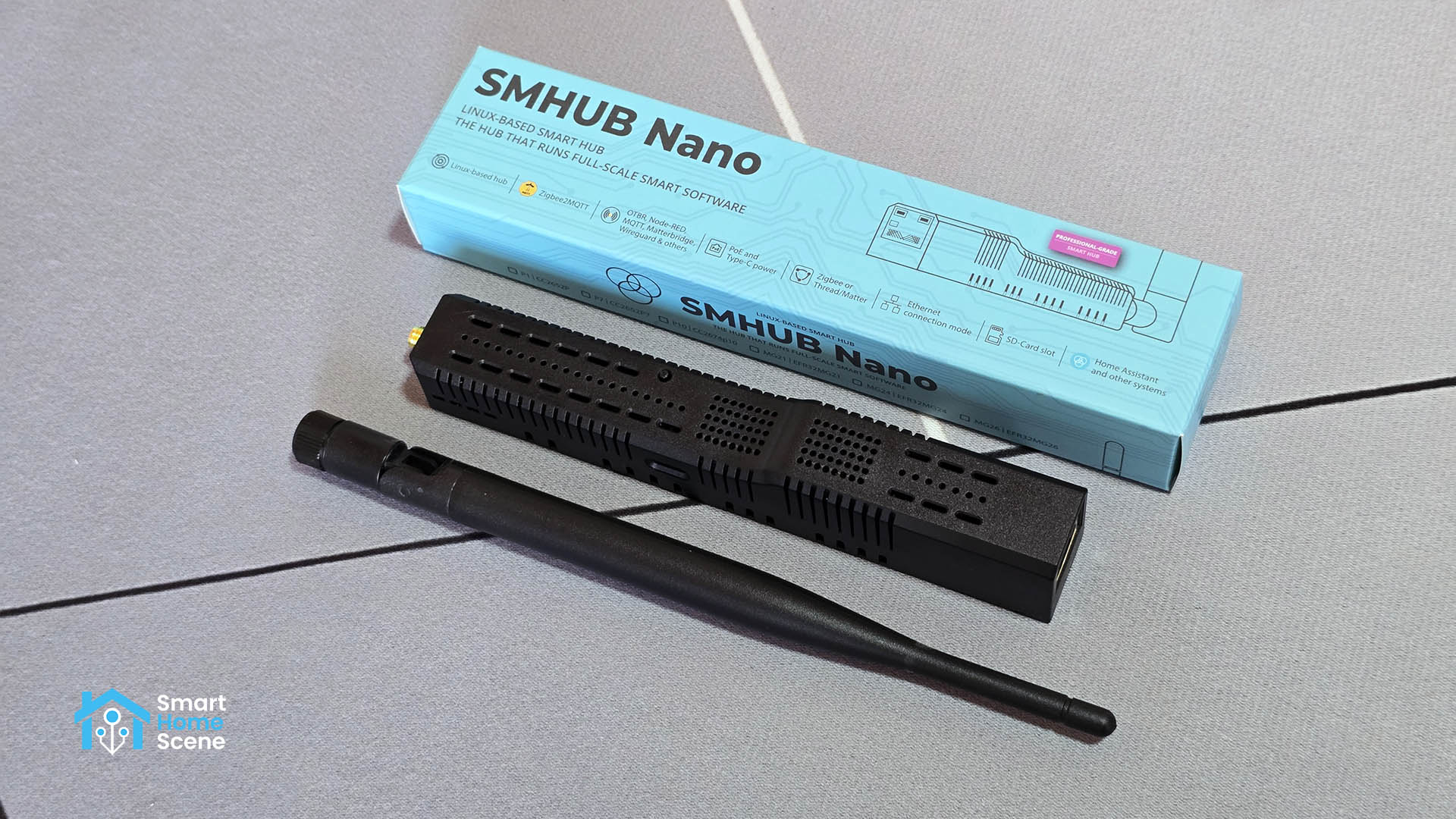
The SMHUB Nano uses the same compact, well-built enclosure as SMLight's SLZB-06 series. It's fanless, includes an external antenna, and supports either the EFR32MG24 or CC2652P7 chip for Zigbee and Thread. Connectivity includes Wi-Fi 6 (2.4 and 5 GHz), Ethernet, Bluetooth 5.0, and a USB host port for expansion. You can add a Z-Wave dongle, an LTE modem, or additional radios via USB.
Setup is straightforward. Plug it in, access the web dashboard, run the initial update, and start installing apps. The SMHUB-OS interface is clean and presents each service (Zigbee2MQTT, Node-RED, Matterbridge) as a standalone application you can enable, configure, and update independently. It's more polished than a DIY Raspberry Pi setup, but it's also more locked down. You're working within SMLight's curated app ecosystem, not installing arbitrary Linux packages.
| Spec | SMHUB Nano MG24 |
|---|---|
| Processor | Linux (SMHUB-OS, Buildroot) |
| Chip | EFR32MG24 or CC2652P7 |
| Protocols | Zigbee 3.0, Thread, Matter, BLE |
| Connectivity | Wi-Fi 6, Ethernet, USB host |
| Apps | Zigbee2MQTT, Node-RED, Matterbridge, MQTT, WireGuard |
| Price | $99 |
Three Ways to Use It
SMLight positions the Nano in three modes. First, as a standalone smart hub. You pair devices to Zigbee2MQTT running on the Nano, write automations in Node-RED, and manage everything locally without Home Assistant. This works, but it's limited. Node-RED is powerful, but it's not a replacement for a full smart home platform. You lose dashboards, voice assistant integrations, and the massive ecosystem of Home Assistant custom components.
Second, as a Matter bridge. Run Zigbee2MQTT and Matterbridge on the Nano to expose Zigbee devices to Google Home, Apple Home, or any Matter controller. This is useful if you want to keep Zigbee devices local but integrate them into a Matter ecosystem. However, most people doing this will just use a direct Matter bridge or a Home Assistant instance with the Matter integration.
Third, as a remote coordinator. Use the Nano as a dedicated Zigbee or Thread coordinator for Home Assistant, connected over Ethernet, USB, or Wi-Fi. This is where the Nano starts to make sense. If your Home Assistant server is in a closet and your Zigbee devices are spread across the house, the Nano can act as a remote radio, improving mesh coverage. But at $99, you're paying a lot for what is effectively a network-connected coordinator. SMLight's own SLZB-06 series does this for $35-50.
Performance and Reliability
In testing, the Nano performed well. Zigbee2MQTT paired devices quickly, the mesh was stable, and Node-RED automations ran without issues. The web interface is responsive, OTA updates work smoothly, and the hardware feels solid. SMLight's firmware and software support is consistently good, and the Nano benefits from that. If you need a dedicated coordinator or a failover hub, it will do the job reliably.
The question is whether you need it. Most Home Assistant installs are stable enough that a backup hub is overkill. If you're running critical automations, a better approach is to use Home Assistant's built-in redundancy features, like running HA in a container with automatic restarts, or setting up a secondary Raspberry Pi with HA in a replicated configuration. Those solutions give you full HA functionality, not just Zigbee2MQTT and Node-RED.
Comparison: SMHUB Nano vs Alternatives
| Product | Price | Key Feature | Best For |
|---|---|---|---|
| SMHUB Nano MG24 | $99 | Standalone Linux hub, Zigbee/Thread/Matter | Failover setups, critical automations |
| Home Assistant Yellow | $140 | Full HA server, Zigbee/Thread built-in | All-in-one HA installation |
| Raspberry Pi 5 + SLZB-06 | $90-110 | DIY, full Linux flexibility | Budget-conscious tinkerers |
The Home Assistant Yellow is the obvious alternative. For $140, you get a full Home Assistant server with Zigbee and Thread built in, plus the entire HA ecosystem. It's more expensive, but it's a complete solution. If you already have Home Assistant running and just want a backup coordinator, the SLZB-06 series is a better value. For $35-50, you get network-connected Zigbee and Thread, and you can run Zigbee2MQTT on your existing server.
A Raspberry Pi 5 with a SLZB-06 coordinator gives you more flexibility than the Nano for roughly the same price. You get a full Linux system where you can install anything, not just SMLight's curated apps. The tradeoff is setup complexity and the lack of a polished, appliance-like interface.
Who Should Buy This?
The SMHUB Nano makes sense for a very specific user: someone running critical automations (security, environmental monitoring, remote sites) who needs a failover system and doesn't want to manage a full secondary Home Assistant server. If your main HA instance goes offline and you need Zigbee devices to keep responding to local automations, the Nano can do that. It's also useful for remote or off-grid installations where you need a lightweight, low-power hub that can operate independently.
For everyone else, it's solving a problem that doesn't exist. Most Home Assistant users don't need a backup hub. If your HA server crashes, you restart it. If you want better Zigbee coverage, you add a remote coordinator like the SLZB-06. If you want Matter integration, you use HA's built-in Matter support. The Nano sits awkwardly between a simple coordinator and a full smart home server, doing both jobs but excelling at neither.
The Verdict
The SMHUB Nano is well-built, reliable, and does exactly what SMLight claims. It runs Zigbee2MQTT, Node-RED, and Matterbridge locally, operates independently of your main server, and provides a solid failover option for critical automations. But at $99, it's expensive for what is essentially a niche backup solution. Most users will get better value from a full Home Assistant Yellow or a DIY Raspberry Pi setup. If you're running a large, redundancy-focused smart home or managing remote installations, the Nano is worth considering. For everyone else, it's an interesting concept that doesn't justify the cost.
Specifications
| Processor | Linux-based (SMHUB-OS, Buildroot) |
| Chip Options | EFR32MG24 or CC2652P7 |
| Protocols | Zigbee 3.0, Thread, Matter, BLE 5.0 |
| Connectivity | Wi-Fi 6 (2.4/5 GHz), Ethernet 10/100, USB host |
| Apps | Zigbee2MQTT, Node-RED, Matterbridge, MQTT broker, WireGuard VPN |
| Power | PoE or USB-C |
| Dimensions | Compact fanless enclosure (SLZB-06 form factor) |
| Price | $99 |
Comparison
| Product | Price | Key Spec | Verdict |
|---|---|---|---|
| SMHUB Nano MG24 | $99 | Standalone Linux hub, Zigbee/Thread/Matter | Best for failover setups |
| Home Assistant Yellow | $140 | Full HA server, Zigbee/Thread built-in | Better all-around hub |
| Raspberry Pi 5 + SLZB-06 | $90-110 | DIY setup, more flexible but no failover | Cheaper, more flexible |
Sources
Get Reviews in Your Inbox
Subscribe for new reviews, buying guides, and honest product verdicts.