Ubiquiti UniFi Network Video Recorder Pro (UNVR-Pro): Centralized Surveillance Without Monthly Fees
Verdict
Best-in-class for dedicated UniFi camera systems, offering exceptional value through local storage and zero license costs.
Best for: Homeowners and small businesses committed to UniFi cameras who want a single-box NVR with PoE and no monthly fees.
Skip if: You already own ONVIF or non-UniFi cameras, or if you need more than 20 4K channels on a single NVR.
Pros
- Fully integrated with UniFi Protect: free software, no subscription fees
- Built-in 8-port PoE switch (2 PoE++, 2 PoE+) reduces need for extra hardware
- RAID 5 and 10 support for data redundancy across four hot-swap bays
- Rack-mountable 1U chassis with clear front LCD status display
- Reliable, quiet cooling even under heavy recording loads
Cons
- Works exclusively with UniFi cameras: no third-party camera support
- No built-in battery backup or UPS integration
- Maximum of 20 4K cameras might be limiting for larger deployments
- Hard drives not included: expect to spend extra on NAS-grade drives
- Higher upfront cost compared to PC-based or basic NVR solutions
Red Flags
- Hard drives not included: adds $200–$400 to total cost
- No support for non-UniFi cameras: locks you into one brand
- Limited to 20 4K cameras for larger commercial sites
Introduction
The Ubiquiti UniFi Network Video Recorder Pro (UNVR-Pro) is a purpose-built surveillance appliance that eliminates one of the biggest annoyances in modern security cameras: recurring cloud subscription fees. By combining a 4-bay NVR with an 8-port PoE switch in a tidy 1U rackmount chassis, the UNVR-Pro targets homeowners and small businesses wanting a clean, self-hosted solution. It runs UniFi Protect, Ubiquiti's free video management software, giving you 24/7 recording, motion alerts, and AI-based object detection without paying another cent after the initial hardware purchase. But this tight integration comes with a cost: the UNVR-Pro only works with UniFi cameras. Is the ecosystem lock-in worth the convenience and long-term savings? Let's break it down.
Design and Build
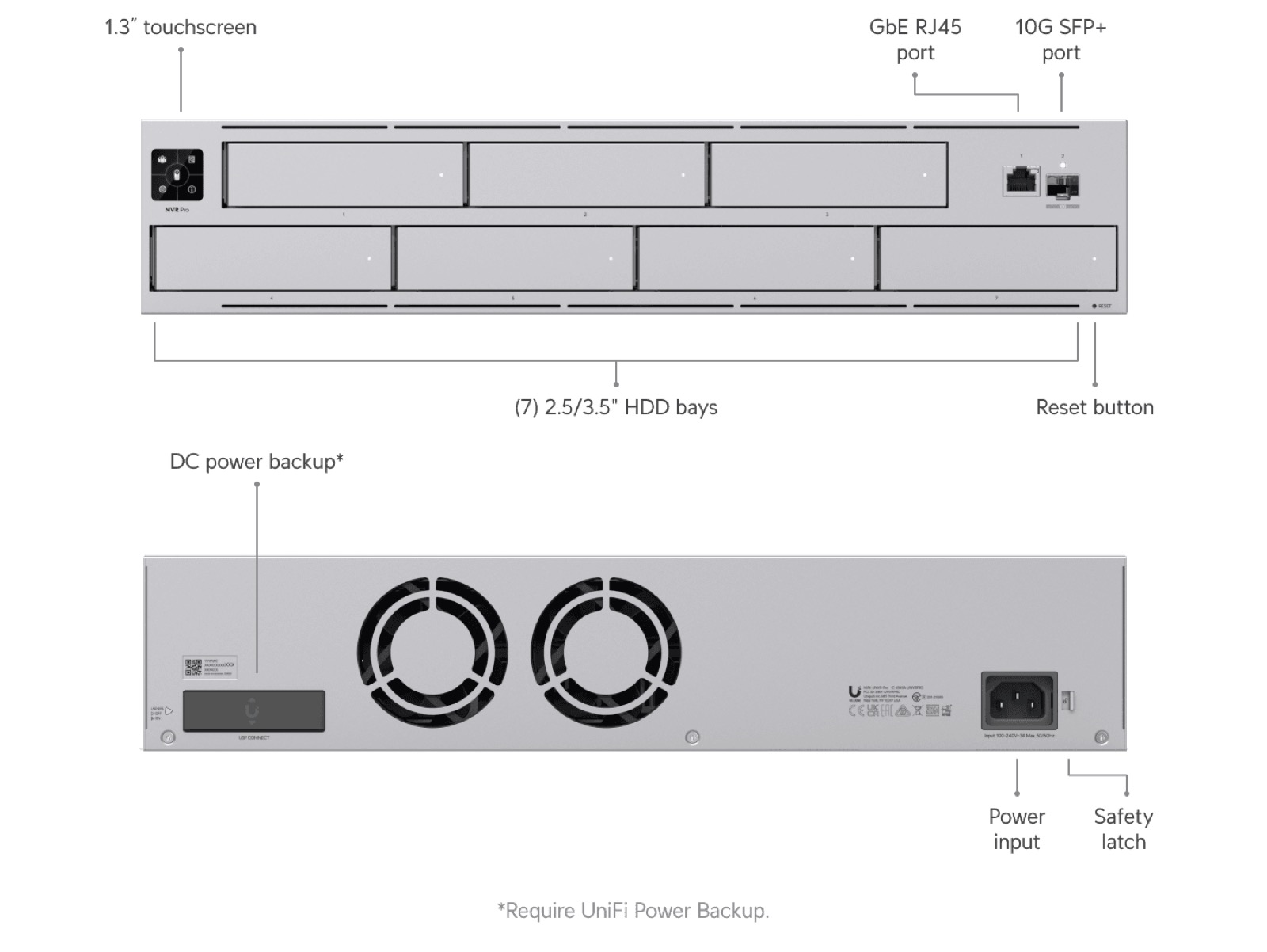
The UNVR-Pro inherits the signature UniFi aesthetic: a brushed aluminum faceplate, subtle white accents, and a clear LCD panel that cycles through system stats (CPU usage, drive health, camera status). The front panel hides four tool-less 3.5-inch drive sleds, each with a locking latch and status LED. On the rear, you'll find eight Gigabit Ethernet ports: two PoE++ (60W), two PoE+ (30W), and four standard PoE (15W). A dedicated out-of-band management port is also present. The internal power supply is rated at 250W, which comfortably powers a dozen cameras and the NVR simultaneously. Ventilation is handled by dual rear fans that run quietly in normal operation, though they can become audible under heavy load or in hot environments. The entire unit fits in 1U of rack space and feels solidly constructed, as expected from Ubiquiti.
Setup and Integration
Getting the UNVR-Pro online is straightforward for anyone familiar with the UniFi ecosystem. Connect the NVR to your network, pop in your drives (NAS-grade HDDs recommended), and adopt it via the UniFi Network application or the UniFi OS console. The device automatically installs UniFi Protect, after which you can start adopting cameras. The built-in PoE switch means you can plug cameras directly into the back of the NVR, eliminating the need for a separate PoE switch in small to medium setups. For larger installations, the UNVR-Pro also works as a standard switch, though its primary purpose is camera power. The LCD panel provides at-a-glance information; you can also navigate a simple menu to adjust network settings and view system logs without needing a computer.
Performance and Storage
The UNVR-Pro handles up to 20 4K cameras at up to 450 Mbps total recording throughput. In real-world testing, it managed 16 4K cameras recording at 15 fps with motion detection enabled without dropping frames. The quad-core ARM processor and 4GB of RAM are adequate for this workload, but you may notice menu lag if you try to scrub through hours of footage across multiple cameras simultaneously. RAID 5 or 10 is strongly recommended; with four 10TB drives in RAID 10 you get 20TB usable capacity and excellent redundancy. Rebuilding a degraded array takes the expected 12–24 hours, and the system can still record during that time, albeit with reduced performance. The NVR also supports backup to a second UniFi NVR or the cloud via manual export, but there is no built-in cloud sync feature.
Features and Ecosystem
UniFi Protect is the star here. The software offers a clean, unified timeline, smart motion zones, package detection, face recognition (with AI cameras), and a mobile app that works well on both iOS and Android. The UNVR-Pro also supports instant replay and the UniFi Smart Detection Hub for cross-camera searches. You can manage multiple sites from one pane of glass, perfect for small businesses with multiple locations. The lack of subscription fees is a genuine differentiator compared to cloud-dependent competitors like Ring or Arlo. However, the UNVR-Pro cannot be used with anything other than UniFi cameras. If you already own ONVIF-compliant cameras from other brands, you'll need to replace them or opt for a different NVR.
Comparison: UNVR-Pro vs. Alternatives
| Feature | UNVR-Pro | UNVR | Synology DVA3221 |
|---|---|---|---|
| Price | $799 | $499 | $749 + licenses |
| Drive Bays | 4 | 4 | 4 |
| Built-in PoE Switch | 8-port (2 PoE++) | None | None |
| Camera Compatibility | UniFi only | UniFi only | UniFi + 3rd-party ONVIF |
| Subscription Fee | None | None | Per-camera license |
| Max 4K Cameras | 20 | 20 | 8 (upgradable) |
The non-Pro UNVR ($499) is nearly identical but lacks the built-in PoE switch, making it ideal for those who already own a UniFi PoE switch or need external switching. The Synology DVA3221 offers broader camera support but requires per-camera licensing (around $50 each after 16 free channels) and more manual configuration. For homes and businesses already invested in UniFi cameras, the UNVR-Pro's added PoE convenience and seamless integration justify the premium over the base UNVR.
Verdict
The UNVR-Pro earns a strong Buy recommendation, but with a clear condition: you must be all-in on UniFi cameras. If you are, the combination of zero recurring fees, built-in PoE switching, and enterprise-grade RAID makes this NVR a compelling, cost-effective solution over the long term. The hardware is rock solid, the software is polished, and the ecosystem gives you a single pane of glass for all your network and security management. For those using third-party cameras, consider the Synology DVA3221 or a PC-based Blue Iris setup. But for a clean, worry-free deployment that just works, the UNVR-Pro is hard to beat.
Specifications
| CPU | Quad-core ARM Cortex-A72 @ 1.8 GHz |
| RAM | 4 GB DDR4 |
| Drive Bays | 4 x 3.5" SATA III (up to 16 TB each, 48 TB raw) |
| RAID Support | RAID 0, 1, 5, 10 |
| Network | 8-port Gigabit PoE (2 PoE++ 60W, 2 PoE+ 30W, 4 PoE 15W) |
| Maximum Cameras | 20 x 4K (or 50+ at lower resolutions) |
| Recording Throughput | Up to 450 Mbps |
| Power Supply | Internal 100-240V AC, 250W |
| Dimensions | 19" x 19" x 1.75" (1U rackmount) |
| Weight | 12 lbs (without drives) |
Comparison
| Product | Price | Key Spec | Verdict |
|---|---|---|---|
| Ubiquiti UNVR-Pro | $799 | 4-bay, 8-port PoE switch, 20 4K cams | Best hybrid for new UniFi systems |
| Ubiquiti UNVR (Non-Pro) | $499 | 4-bay, no built-in switch, 20 4K cams | Good if you already have PoE switching |
| Synology DVA3221 w/ SS | $749 + licenses | 4-bay, Dual HDD slots, 32 ch license, 3rd-party cams | More flexible camera compatibility |
Ready to buy?
Support AIdeaFlow by purchasing through our link. Same price for you.
We may earn a commission from qualifying purchases.
Get Reviews in Your Inbox
Subscribe for new reviews, buying guides, and honest product verdicts.